Deleting thousands of files from M-Files
Summary
In this article I am discussing mass file deletion from M-Files and why this is sometimes useful and conclude with a C# implementation that is able to delete files based on their object type or class.
Use Cases
When you are inserting a lot of files you probably need to delete a lot of files as well. In my case, as I've been writing the importer I am using unit tests to test if the insertion works and if it does, I end up with a lot of new files in my M-Files vault. So to make the process of insertion repeatable, I needed a way to reset the vault back to it's former state.
If you'd be working with a database, you'd usually wrap the insertion into a transaction that gets rolled back automatically when you're finished with the test, but sadly M-Files lacks support for this concept.
One option to achieve this is to restore a backup of the vault that was taken before the insertion process. Another way is deletion of the inserted files. Both having different trade-offs. In this installment I am going to visit deleting objects from M-Files.
Another use case comes up if you are creating a new vault by copying all data, but you want to keep only a subset of it and get rid of the rest.
Or you've just done a mass import of files and noticed that you've missed specifying a property or some other error and the quickest way to solve the problem is to repeat the insertion process, but first you need to get rid of the files you just imported.
Deletion is not what you think
Ususally deletion means removal of the files, but M-Files treats deletion differently, it just marks the files in question as deleted. They are still held in the M-Files Vault and can still be retrieved and therefore still take away resources like memory and disk space.
Instead of deleting files, the complete removal of files is achieved by destroying files.
Destroying Objects
Destroying objects in M-Files is independent from deletion - you do not need to delete an object before you destroy it, you can just go ahead and destroy it and be done with it.
Steps involved in destroying an object
- Login to the vault
- Retrieve the
ObjIDof the object you want to destroy - call
Vault.ObjectOperations.DestroyObject()and supply the ObjID
Login to the vault
The login sequence is straightforward:
- Create an
MFilesServerApplicationinstance - Call it's
Connect()method and supply your credentials - Iterate through it's vaults and login to your target vault by
calling it's
LogIn()method.
Retrieve the ObjID
There are plenty of options to retrieve the ObjID of the object or objects you want to destroy.
- Maybe you already know the Id of the object. That would be the case if you inserted the object before and stored the Id of the newly created object somewhere.
- You may want to execute a view and delete the objects it returns.
- Or you may want to search for objects based on some common criteria, like their object type or class.
Searching for Objects
Searching for Objects in M-Files can be achieved by using the
SearchCondition class. The following examples demonstrate the use of
the SearchCondition class to look for objects that correspond to a
specific object type or class.
Search by ObjectType
The following code snippet creates a SearchCondition instance that
looks for all objects that are of the specified objectType.
/* find all files with the specified object type */
var searchCondition = new SearchCondition();
searchCondition.ConditionType = MFConditionType.MFConditionTypeEqual;
searchCondition.Expression.DataStatusValueType = MFStatusType.MFStatusTypeObjectTypeID;
searchCondition.TypedValue.SetValue(MFDataType.MFDatatypeLookup, objectTypeId);
Search by class
In the following code snippet a SearchCondition instance is created
that allows searching for objects that belong to the specified class.
/* find all files with the specified class */
var searchCondition = new SearchCondition();
searchCondition.ConditionType = MFConditionType.MFConditionTypeEqual;
searchCondition.Expression.DataPropertyValuePropertyDef = (int)MFBuiltInPropertyDef.MFBuiltInPropertyDefClass;
searchCondition.TypedValue.SetValue(MFDataType.MFDatatypeLookup, classId);
Getting results
After creating a SearchCondition that looks for the objects, we need to execute the search to retrieve the results.
This is done by calling
Vault.ObjectSearchOperations.SearchForObjectsByConditionsEx() and
supplying the SearchConditions.
The SearchForObjectsByConditionsEx() method returns an instance of the
ObjectSearchResults class.
Enumerating the ObjectSearchResults we find ObjectVersion instances
and it's ObjVer.ObjID property that we can use as a parameter to the
aforementioned DestroyObject() method.
Hint
One Advantage of calling the Ex version is that you can specify
additional search parameters, like MaxResultCount and
SearchTimeoutInSeconds which is pretty important if you are dealing
with a lot of files. Otherwise you might end up with an incomplete query
and may overlook files that exceeded the maximum result count.
Putting it all together
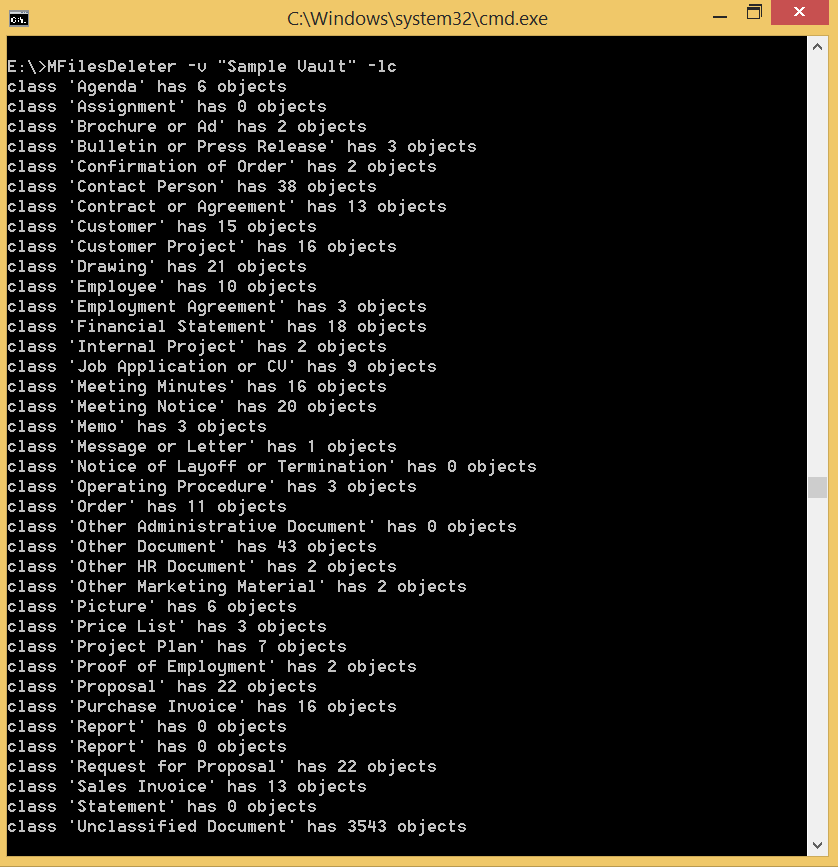
I've put together a small C# Console Application that implements the whole process and uploaded it to github.
Screenshots

References
If you have any questions or comments, feel free to leave a comment below or e-Mail me and thank you for reading!
Take care,
Martin
Vault Exporter
I've started working on a commercial Software for exporting Documents from M-Files at:
https://vault-exporter.com
Note: Not all features are fixed yet, so if you want to join the discussion or you just want to be notified when it launches, please head over and join the mailing list to receive an update when it launches.