SkiaSharp with Wpf Example
Background
After SkiaSharp was announced by Miguel de Icaza on his blog, I downloaded the nuget and took it for a spin and used it for some image manipulation.
While the sample code got me started, it was written for System.Drawing/GDI+ and when I later wanted to use it in a Wpf app, I didn't find any sample code for that. So I wrote some code and this blog post, in case someone else might find that useful.
Drawing a Bitmap in Wpf
ImageSource and WriteableBitmap
Basically, when you're using Wpf you most often want to use an ImageSource, for example to display it within an Image control. When creating an ImageSource yourself, the WriteableBitmap comes in handy. It is not only a subclass of ImageSource, it's also double buffered, which allows a smooth udpate process.
Sourcecode
I've written the following code to do that:
public WriteableBitmap CreateImage(int width, int height)
{
  return new WriteableBitmap(width, height, 96, 96, PixelFormats.Bgra32, BitmapPalettes.Halftone256Transparent);
}
public void UpdateImage(WriteableBitmap writeableBitmap)
{
  int width  = (int)writeableBitmap.Width,
      height = (int)writeableBitmap.Height;
  writeableBitmap.Lock();
  using (var surface = SKSurface.Create(
    width: width,
    height: height,
    colorType: SKColorType.Bgra_8888,
    alphaType: SKAlphaType.Premul,
    pixels: writeableBitmap.BackBuffer,
    rowBytes: width * 4))
  {
    SKCanvas canvas = surface.Canvas;
    canvas.Clear(new SKColor(130, 130, 130));
    canvas.DrawText("SkiaSharp on Wpf!", 50, 200, new SKPaint() { Color = new SKColor(0, 0, 0), TextSize = 100 });
  }
  writeableBitmap.AddDirtyRect(new Int32Rect(0, 0, width, height));
  writeableBitmap.Unlock();
}
Basically, what we want to do is:
- Create a WriteableBitmap of the appropriate size
- Update the WriteableBitmap with Skia
- Lock the Backing Buffer
- Use Skia with the matching pixelformat to draw into the backing buffer
- Mark the Bitmap as dirty
- Unlock the Bitmaps Backing Buffer again
Note: Don't forget to mark the updated region of the bitmap as dirty, else nothing is going to happen!
Example Wpf App
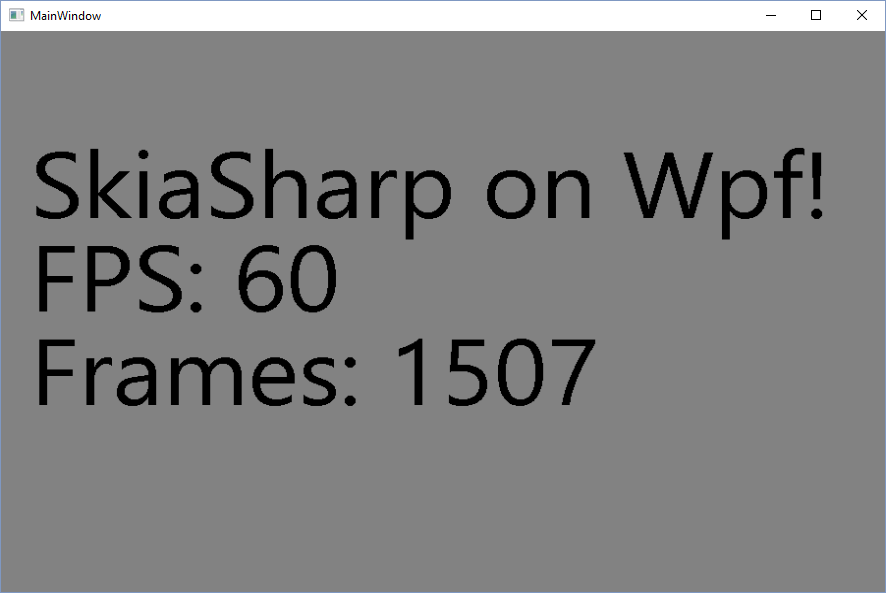
Now that I was able to render an Wpf image with Skia and the WriteableBitmap class supports double buffering, I wanted to create a quick app that updates the Image once per frame.
For that, I've subscribed the CompositionTarget.Rendering event and
updated the render method to draw the number of elapsed frames. You can
see the output on the screenshot below:
Screenshot
Sourcecode on Github
If you're interested in the example app, I've uploaded the source of the SkiaSharp Wpf Example Application to github at https://github.com/8/SkiaSharp-Wpf-Example
If you find any of that useful or I am missing something, please feel free to drop me a comment below, thanks!
Take care,
Martin
References
- System.Drawing/GDI+ (https://msdn.microsoft.com/en-us/library/system.drawing%28v=vs.110%29.aspx)
- ImageSource on msdn (https://msdn.microsoft.com/en-us/library/system.windows.media.imagesource%28v=vs.110%29.aspx)
- WriteableBitmap on msdn (https://msdn.microsoft.com/en-us/library/system.windows.media.imaging.writeablebitmap%28v=vs.110%29.aspx)
- SkiaSharp (https://developer.xamarin.com/guides/cross-platform/drawing/)
- Cross-Platform 2D Graphics with SkiaSharp (https://blog.xamarin.com/cross-platform-2d-graphics-with-skiasharp/)
- SkiaSharp Wpf Example App on github (https://github.com/8/SkiaSharp-Wpf-Example)